Introduction
A website can become one of the most lucrative tools for starting and growing a business, building a personal brand, generating affiliate income, selling products, or attracting clients. But many websites fail before they don’t even get the chance to grow. The reason is not always due to bad products/services or lack of effort. In many cases, the real problem is usually avoidable website mistakes.
Some websites look beautiful but load slowly. Others provide valuable contents but have terrible navigation. Some are mobile-unfriendly, while others fail to setup their website for SEO completely or ignore it. These issues may seem small individually, but together they can destroy trust, reduce traffic, lower conversions, and push visitors away.
In this era internet users expect speed, clarity, professionalism, and convenience even me. If your website cannot provide those things which are actually not very difficult, your visitors will quickly leave and move to another website. Studies consistently shows that internet users judge websites within seconds. That means your website design, loading speed, content structure, and user experience matter more than ever.
Whether you operate a blog, portfolio, business website, eCommerce store, educational platform, or affiliate marketing site, avoiding common website mistakes can dramatically affect your website overall results.
In this guide, we will cover the biggest website mistakes people make knowingly or unknowingly and how to fix them. By the end of this guild, you’ll understand how to create a website that looks professional, ranks better on search engines, keeps visitors engaged, and able to convert traffic into real growth.
Lets get started.
Mistakes website owners should avoid
1. Ignoring Mobile Optimization
One of the biggest website mistakes people make is designing their website only for desktop users.
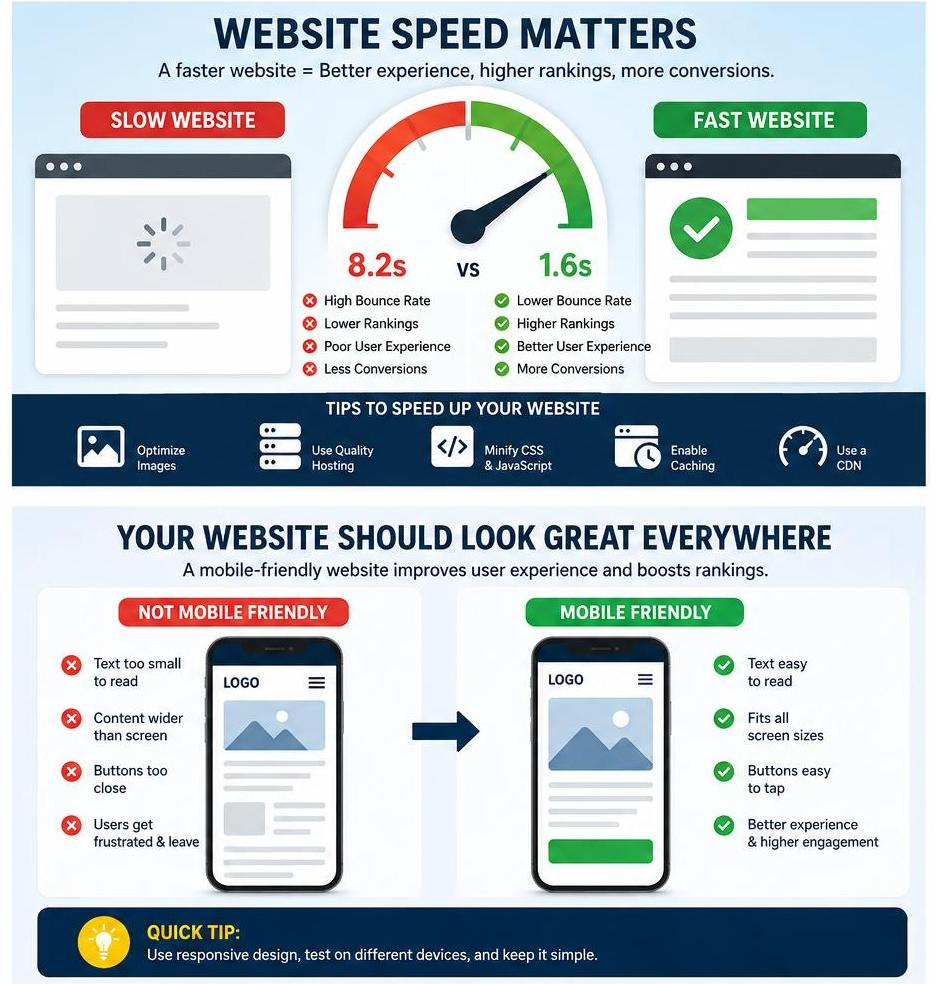
Majority of internet traffic today comes from smartphones. If your website is not mobile-friendly it will look broken when viewed on mobile devices. Buttons may overlap, text may appear too small, images may overflow the screen, and navigation may become frustrating. And viewers will leave almost immediately.
When your website is mobile-unfriendly, it creates a poor user experience and can also hurt your search engine rankings because search engines prioritize mobile usability.
Some Common Mobile Design Problems To Avoid
- Tiny unreadable text
- Buttons too close together
- Slow loading speed on smartphones
- Images not resizing correctly on mobile
- Menus that don’t work properly
- Content appear wider than the screen
- Popups blocking the page
How to Fix Mobile Design Problems
Use responsive web design so your layout adapts to different screen sizes automatically.
Best practices include:
- Use flexible grids
- Set responsive image widths
- Use larger fonts for readability
- Test navigation on phones
- Optimize spacing for touchscreens
- Use mobile-friendly menus
Design your website to feel smooth and easy to use on every device.
2. Slow Website Loading Speed
People hate slow websites. I’m sure you do to because I do it’s frustrating.
If your website takes too long to load, visitors leave even before seeing your content. Your website speed affects user experience, SEO rankings, engagement, and sales.
Even a delay of a few seconds which may look not bad to you, can significantly reduce conversions.
Major Causes of Slow Websites
- Huge image files
- Poor hosting
- Too many plugins
- Heavy animations
- Unoptimized code
- Large videos
- Excessive scripts
Why Speed Matters
I am sure now we all know why website loading speed matters but I will still tell you exactly how loading speed affects your website.
A fast website:
- Improves SEO
- Reduces bounce rate
- Increases user trust
- Boosts conversions
- Makes navigation smoother
How to Improve Your Website Loading Speed
Compress Images
Using large images are one of the main causes of slow websites. Use compressed formats like WebP or optimized JPG files.
Minify CSS and JavaScript
Remove unnecessary spaces and code to reduce file sizes.
Use Better Hosting
Cheap or free hosting may save money initially but often causes slow performance.
Hosting recommendation:
- Truehost
- Godaddy
- Bluehost
Enable Browser Caching
Caching stores files locally so returning visitors load pages faster.
Reduce Plugin Usage
Too many plugins slow down websites and may create security problems. Delete plugin that are not useful
Use Lazy Loading
Load images only when users scroll to them.
Fast websites feel more professional and trustworthy.
3. Poor Navigation Structure
If visitors cannot find what they need quickly, they leave.
Many websites have confusing menus, cluttered navigation bars, hidden pages, or inconsistent layouts.
Good navigation can help users move naturally through your website. Your navigation should be very easy to understand for everyone not only experienced internet users.
Signs of Bad Navigation
- Too many menu items
- Unclear labels
- Hidden pages
- Broken links
- Confusing categories
Good Navigation Practices
Keep Menus Simple
Use clear menu names such as:
- Home
- About
- Blog
- Services
- Contact
Add Search Functionality
This is more important for blogs, tutorial websites, and large platforms.
Use Internal Linking
Guide visitors to related content.
Keep Layout Consistent
Menus should remain similar or the same across all your website pages.
Make Navigation Mobile-Friendly
Use responsive menus for smaller screens.
Simple navigation increases user engagement and helps visitors stay longer.
4. Weak Website Design
A poor-looking website immediately reduces credibility.
Some users judge websites visually before reading any content. If your site looks outdated, messy, or unprofessional, visitors may assume your business is unreliable.
Common Design Mistakes
- Too many colors
- Inconsistent fonts
- Poor spacing
- Cluttered layouts
- Low-quality images
- Excessive animations
- Difficult-to-read text
Principles of Good Website Design
Keep It Clean
Minimal layouts usually perform better.
Use White Space
Spacing improves readability and organization.
Limit Fonts
Use 2–3 fonts maximum.
Maintain Brand Consistency
Use consistent colors, styles, and visuals.
Use High-Quality Images
Blurry images hurt credibility.
Focus on Readability
Text should be easy to scan and understand not too big and not not too small.
Good design is not about making a website flashy. It’s about making it effective. Also have in mind everyone have different meaning on web design. So design design your website base on my advise rather focus on your niche and brand
5. Ignoring SEO
Many websites fail because there are not easy for anyone to locate.
Search Engine Optimization (SEO) helps websites appear in search results. Without SEO, even great content may remain invisible.
Common SEO Mistakes
- Missing keywords
- Poor headings
- Duplicate content
- No meta descriptions
- Broken links
- Slow loading speed
- Missing alt text
- Weak or no internal linking
Basic SEO Practices
Use Proper Headings
Structure content using H1, H2, and H3 headings.
Optimize Keywords Naturally
Avoid keyword stuffing.
Write Meta Descriptions
Encourage clicks from search results.
Add Alt Text to Images
It improves accessibility and SEO.
Use Internal Links
Connect related pages and posts.
Create Valuable Content
Helpful content performs better long-term. Don’t create contents base on how to feel or want it should be based on what your viewers need.
SEO is not magic. It’s about helping search engines understand your website.
6. Bad Content Structure
Even if you have good and valuable information, if it is presented poorly it will fail.
Visitors scan content quickly. Huge blocks of text without spacing make readers leave.
Common Content Mistakes
- Long paragraphs
- No headings
- Poor grammar
- Difficult language
- Lack of formatting
- Repetitive content
How to Improve Content
Use Short Paragraphs
Break information into smaller sections.
Add Headings and Subheadings
It improves readability and organization.
Use Bullet Points
It helps readers scan faster.
Write Clearly
You need to avoid unnecessary complexity.
Include Visuals
Images, videos, and graphics increase engagement.
Good content keeps visitors interested and improves retention.
7. No Clear Call-to-Action (CTA)
Many websites fail because they never tell visitors what to do next.
A Call-to-Action guides users toward an action such as:
- Buying a product
- Signing up
- Contacting you
- Downloading a file
- Watching a video
Weak CTA Examples
- “Click here”
- Hidden buttons
- Too many competing actions
Strong CTA Examples
- Start Your Free Trial
- Download the Guide
- Watch the Tutorial
- Get Started Today
- Contact Us Now
CTA Best Practices
- Make buttons visible
- Use action-focused text
- Place CTAs strategically
- Avoid overwhelming users
A website without CTAs loses opportunities daily.
8. Ignoring Website Security
A website with security problems can destroy trust instantly.
Hackers target weak websites constantly. If your website gets hacked, visitors may lose trust permanently.
Common Security Mistakes
- Weak passwords
- Outdated plugins
- No SSL certificate
- Poor hosting security
- No backups
Security Best Practices
Use HTTPS
SSL certificates protect user data.
Update Software Regularly
Outdated systems create vulnerabilities.
Use Strong Passwords
Avoid using simple passwords. Many people create passwords related to themselves e.g date of birth, phone number, address etc. Create passwords that are difficult or impossible to guess even by friends and family.
Backup Your Website
Always have recovery options.
Limit Plugin Usage
Only install trusted plugins.
Security is essential for both users, search rankings, and website owners.
9. Using Too Many Popups
Popups can increase conversions when used correctly, but excessive popups annoy visitors.
Common Popup Problems
- Appearing immediately after page load
- Blocking content
- Difficult to close
- Appearing repeatedly
- Too many on one page
Better Popup Strategy
- Delay popup timing
- Use exit-intent popups
- Keep them simple
- Make closing easy
- Avoid mobile frustration
User experience should always come first.
10. Poor Typography
Typography affects readability more than most people realize.
Bad font choices can make content difficult to read.
Typography Mistakes
- Tiny fonts
- Decorative fonts everywhere
- Poor spacing
- Weak contrast
- Too many font styles
Typography Tips
- Use readable fonts
- Increase line spacing
- Maintain good contrast
- Limit font variety
- Use proper font sizes
Readable text improves engagement and professionalism.
11. Ignoring Analytics
Without analytics, you are guessing.
Website analytics help you understand:
- Traffic sources
- User behavior
- Popular pages
- Bounce rates
- Conversion performance
Why Analytics Matter
Analytics reveal:
- What works
- What fails
- Where users leave
- Which pages perform best
Important Metrics
- Page views
- Bounce rate
- Session duration
- Traffic sources
- Conversion rates
These data help you improve strategically instead of randomly.
12. Broken Links and Errors
Broken pages frustrate users and hurt SEO.
Nothing damages credibility faster than clicking a link and seeing an error page.
Causes of Broken Links
- Deleted pages
- Wrong URLs
- Website restructuring
- Plugin issues
How to Prevent It
- Check links regularly
- Redirect deleted pages
- Use website audit tools
- Fix errors quickly
A professional website should feel reliable.
13. Cluttered Homepage
Some websites try to show everything at once.
Too much information overwhelms visitors and reduces clarity.
Homepage Mistakes
- Too many banners
- Excessive animations
- Information overload
- Multiple conflicting CTAs
- Poor organization
Better Homepage Strategy
For a better homepage, focus on:
- Clear headline
- Main value proposition
- Simple navigation
- Strong CTA
- Clean visuals
Your homepage should serve as a guide to new visitors, not confuse them.
14. Copying Other Websites Completely
Inspiration is good. Copying is not.
Many beginners clone designs without understanding branding or usability. Don’t just clone a website instead try to recreate it to fit your brand/niche.
Problems With Copying Other Website Completely
- No originality
- Weak brand identity
- Possible copyright issues
- Generic user experience
Here Is A Better Approach
Study successful websites but create your own unique identity.
Your website should reflect:
- Your audience
- Your goals
- Your brand personality
Originality builds memorability.
15. Ignoring Accessibility
Web accessibility helps all your website users interact with your website, including people with disabilities.
Ignoring accessibility excludes users and reduces usability.
Accessibility Mistakes
- Poor contrast
- Missing alt text
- No keyboard navigation
- Tiny clickable areas
Here Are Somethings To Do If You Want To Improve Accessibility
- Use readable colors
- Add image descriptions
- Improve navigation
- Use proper labels
- Ensure keyboard compatibility
If your website is accessible, it creates better experiences for everyone.
16. Lack of Trust Signals
Visitors need reassurance before buying or contacting you.
Without trust signals, users may hesitate.
Important Trust Signals
- Testimonials
- Reviews
- Contact information
- Professional design
- HTTPS security
- Portfolio examples
- Social proof
Why Trust Matters
People buy from businesses they trust.
Even small trust improvements can significantly increase conversions.
17. Over complicated Forms
Long forms reduce conversions.
Users dislike filling unnecessary fields.
Bad Form Practices
- Asking for too much information
- Complex layouts
- No autofill support
- Weak error messages
Better Form Design
- Keep forms short
- Use clear labels
- Simplify input fields
- Show helpful feedback
Simple forms increase completion rates. Remove all unnecessary field in your form.
18. Not Updating the Website
An outdated website feels abandoned.
Old content, expired offers, and outdated designs reduce credibility.
Signs of an Outdated Website
- Old copyright dates
- Broken features
- Expired promotions
- Ancient blog posts
- Obsolete design trends
Why Updates Matter
Regular updates:
- Improve SEO
- Increase trust
- Maintain security
- Keep users engaged
Websites should evolve continuously. Try to always update your website it only take few hours depending on your web design skills
19. Poor Image Optimization
Optimized images improve websites, but bad image practices create problems.
Common Image Mistakes
- Huge file sizes
- Blurry visuals
- Wrong dimensions
- Missing alt text
Better Image Practices
- Compress images
- Use modern formats
- Optimize dimensions
- Maintain visual quality
Images should enhance not slow down the experience.
20. No Brand Identity
Many websites look forgettable because they lack branding.
Weak Branding Signs
- Inconsistent colors
- Generic messaging
- Random design choices
- No personality
Strong Branding Includes
- Consistent visuals
- Clear voice
- Memorable identity
- Professional presentation
Branding helps people remember your website. If your website lack branding start fixing it immediately after you finish reading this content.
21. Using Too Many Ads
Too many ads create a terrible user experience.
Visitors may feel spammed or distracted.
Ad Mistakes
- Aggressive popups
- Excessive banners
- Auto-playing ads
- Ads covering content
Better Monetization Strategy
Balance revenue with usability.
Users should focus on content first. Making money through ads is important however don’t over do it because you will only hurt your viewers and probably chase them away.
22. Ignoring User Experience (UX)
User Experience is the foundation of successful websites.
A site can look beautiful but still frustrate users.
UX Problems
- Confusing layouts
- Slow interactions
- Poor navigation
- Hard-to-find information
Good UX Principles
- Simplicity
- Speed
- Clarity
- Accessibility
- Consistency
Great UX keeps visitors engaged longer. UX is a continuous process.
23. Weak About Page
Your About page matters more than many people realize.
People want to know:
- Who you are
- What you do
- Why they should trust you
Bad About Pages
- Too vague
- No personality
- No credibility
- Too short
Better About Page Strategy
Include:
- Your story
- Your mission
- Your experience
- Your achievements
A strong About page builds emotional connection. And tells viewers who you are and what to expert from you. When writing your about page don’t give false information such as including services/products you don’t offer or qualification you don’t have. It might make you appear professional which is good but it’s a lie and it will affect you negatively in the long run.
24. Forgetting Contact Information
If people cannot contact you easily, you lose opportunities.
Common Contact Mistakes
- Hidden contact pages
- No email
- Broken forms
- No social links
Better Contact Experience
Provide:
- Contact form
- Social media
- Business details
Communication should feel effortless. Add all contact information where users can find them effortlessly.
25. Designing for Yourself Instead of Users
This is one of the most dangerous mistakes.
Some website owners prioritize personal preferences instead of user needs.
Examples
- Fancy animations that slow pages
- Overly artistic navigation
- Complex layouts
- Difficult interactions
Better Mindset
Design your website based on:
- User goals
- Usability
- Simplicity
- Clarity
A website exists to serve visitors not the owner’s ego. So your priorities should be your users not you.
26. Not Testing the Website Properly
Launching a website without testing it leads to problems.
What to Test
- Mobile responsiveness
- Browser compatibility
- Loading speed
- Forms
- Navigation
- Links
- Images
Why Testing Matters
Testing helps identify issues before users encounter them.
Professional websites are carefully tested. Test your website on both mobile and desktop and ask friends/family and web designers if you know any to test your website and give feedback. Take all feedback into consideration and fix all issues before launching.
27. Relying Entirely on Trends
Design trends change constantly.
Some trends improve websites. Others hurt usability.
Risky Trends
- Excessive animations
- Overly minimalist navigation
- Auto-play videos
- Experimental layouts
Better Strategy
Use trends carefully while prioritizing usability.
Timeless design usually performs better long-term. If you design your website base on trends, I am sure you know trends come and go so ask yourself what will happen to my website when that time comes.
28. Lack of Content Strategy
Random content rarely builds growth. A successful website needs direction.
Content Strategy Includes
- Target audience
- SEO goals
- Posting schedule
- User intent
- Content structure
Benefits of Strategy
- Better traffic
- Stronger branding
- Improved engagement
- Higher conversions
Consistent valuable content builds authority.
29. Ignoring Conversion Optimization
Traffic alone does not guarantee success. Your website should encourage meaningful actions.
Conversion Optimization Includes
- Better CTAs
- Improved layouts
- Faster speed
- Trust signals
- Simpler forms
Why It Matters
Small improvements can significantly increase revenue or leads.
30. Giving Up Too Early
Many people abandon websites too quickly. When creating a website have in mind web growth often takes time. SEO, branding, audience building, and trust development happen gradually.
Common Early Mistakes
- Expecting instant traffic
- Quitting after low engagement
- Constantly redesigning
- Changing direction too often
Better Approach
Focus on:
- Consistency
- Improvement
- Learning
- Patience
Successful websites are usually built through long-term effort. Before creating prepare yourself mentally, emotional, physically, financial and even medically.
Final Thoughts
Building a successful website is not just about creating pages and publishing content. It’s about creating an experience people enjoy using.
The biggest website mistakes often seem small individually:
- Slow speed
- Weak navigation
- Poor design
- No SEO
- Bad mobile experience
But together, these issues can completely destroy a website’s performance. The good news is that most website problems are fixable.
If you focus on:
- Speed
- Mobile responsiveness
- Good design
- SEO
- User experience
- Strong content
- Clear branding
you will already be ahead of many websites online today.
Remember that successful websites are continuously improved. The best website owners regularly analyze performance, listen to users, optimize content, and adapt to changing technology.
A great website is not built overnight. It is built through consistency, testing, creativity, and attention to user needs.
Avoid these mistakes, keep learning, and your website will have a much stronger chance of growing into something valuable, professional, and profitable in the long run.
Thanks for reading till the end.
Are you ready to start creating, improving and growing your website today? Drop your answer below.
If you can’t design yourself a professional website, contact us and let us work together to archive your goal.
Related Posts
How to Create a Website In Minutes.
Website Template You Need to Checkout
Search Engine Optimization Starter Guide